
NOTES, NEXT ACTIONS AND YOUR DAY IN CONTEXT
An interstitial journaling app for a more mindful workday
Your workday includes plans, unexpected calls, useful ideas and moments when your attention wanders. Interstitial journaling gives them one running record. Use memoir to note what is happening between activities and decide what deserves your attention next.

For iPhone and iPad. Listed as Memoiri on the App Store.

TRY IT NOW
Try one workday transition
Use a short note to close one activity and make the next action visible.
Pause between activities
Stop when a task ends, changes or gets interrupted.
Record the handover
Write what happened, where you stopped and what comes next.
Read it when you return
Use the last note to recover the decision instead of rebuilding it from memory.
What is interstitial journaling?
In her Ness Labs explanation of interstitial journaling, Anne-Laure Le Cunff describes a practice created by Tony Stubblebine: brief, timed notes between activities that combine observations, intended actions and a record of the day.
The entries can hold progress, a distraction, an idea or how you feel. A planned break offers a chance to look back and choose what comes next; noticing an unplanned detour offers another chance to pause. The practice needs no particular software.
A journal app with timestamps for your task transitions
Choose a journal for your workday. You can create a separate journal if you want these notes apart from family memories or other writing. Keep each transition as its own entry so you can read the sequence in the timeline.
Open the composer, write what matters at this point and save. Memoir supplies the date and time. The writing guide shows how to save and edit entries. You can begin with a single sentence and add detail when a situation needs it.
What to keep in the log
Your next action: use plain text such as “Email the revised estimate to Jo.” When you return to the entry, add what happened or save a follow-up. For deadlines that need an alert, put them in your task or calendar app too; a memoir entry does not schedule that action.
Ideas and reading for later: paste an article URL into an entry with a reason to revisit it, or write down a question without following it immediately. A consistent phrase such as “Read later” gives you something to search for when you have time.
Your state of mind: add a mood to an entry and name the situation behind it. “Worried about presenting the estimate. I need to check the assumptions first.” gives your later self more context than the emoji alone.
Time and context: memoir keeps the entry timestamps alongside your writing. Read them together to reconstruct your day. The interval between two notes can include unrecorded activity, so it is not a measurement of uninterrupted work.
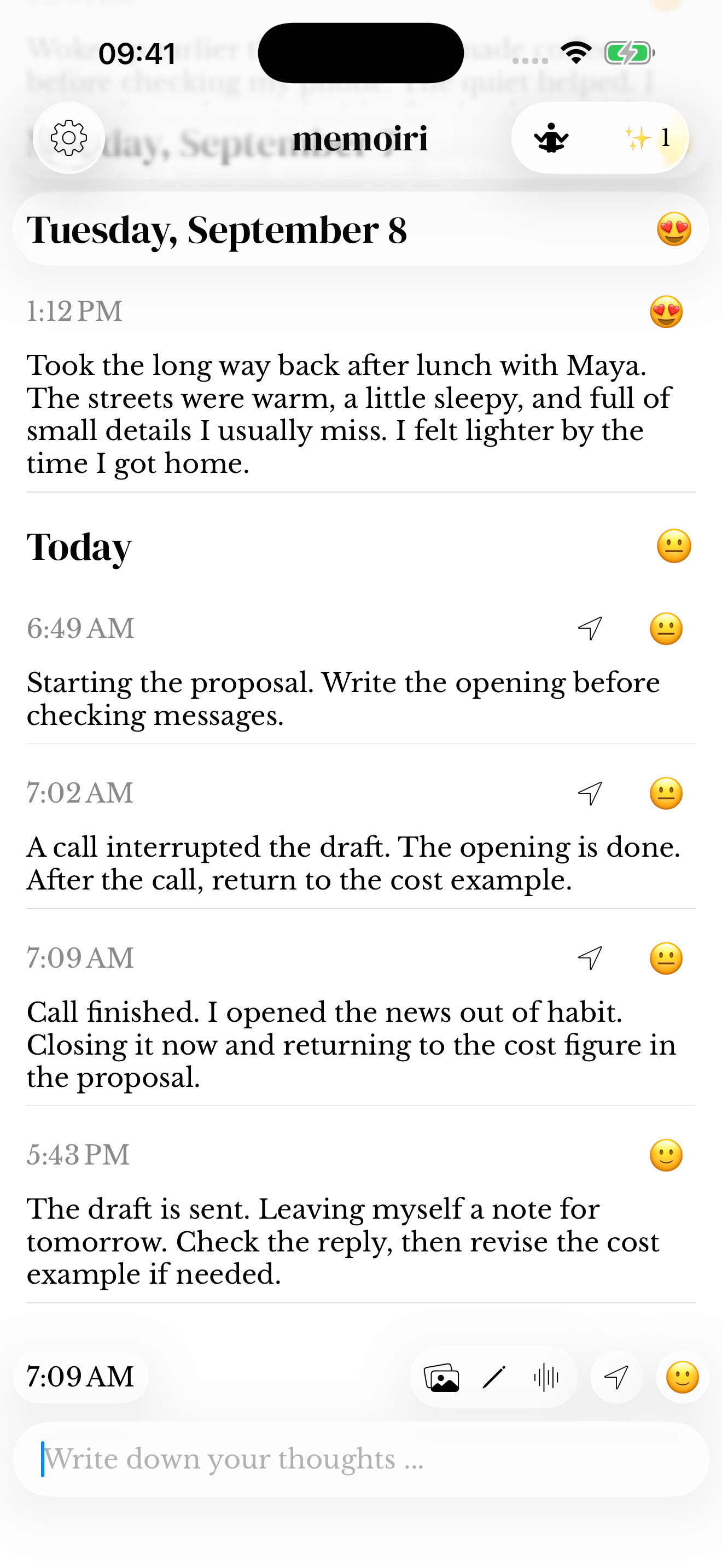
Follow one piece of work through the interruptions
The same task runs through this example. The notes preserve a stopping point, catch a detour and make returning to the work concrete. Use your own words; you do not need to fill in a form.
9:05 AM · Begin
Starting the proposal. First: write the opening paragraph before checking messages.
9:32 AM · Interrupted
A call pulled me away. The opening is done; the cost example still needs a figure. Next: finish the call, then return to that example.
10:08 AM · Return
Call finished. I opened the news out of habit. Closing it now. Next: add the cost figure.
10:35 AM · Close the loop
The example is in and the draft is ready to send. Leaving a note to check the reply after lunch.
Make the practice fit the way you capture
When typing is inconvenient, save a voice note about the decision you just made, or record it from your Apple Watch. A spoken handover to yourself can belong in the same journal as your written notes.
If the context is visual, attach a photo of your own whiteboard or add a sketch to the entry. Include the project name in your writing so you have a familiar word to search for later. The photo guide and sketch guide explain the controls.
Use the record when you return
Before reopening a piece of work, read its last entry. Search for “proposal” or another project word to recover the stopping point, saved reading and decisions you recorded. This is where the log becomes useful beyond the moment of writing it.
At the end of the day, leave a closing entry with any unfinished action you want to carry forward. Later, the journal preserves your own account of the workday alongside its moods. Reflection can show recorded mood trends; it does not grade your productivity or automatically turn these notes into a project report.
Try one transition first
At your next break, open memoir and write a short handover to yourself. “The draft needs a clearer opening. I will try the customer example next.” Save it, then see whether that note helps when you return.
Read the Ness Labs article for its explanation and Roam Research walkthrough. The instructions on this page adapt the practice to memoir; Roam commands and linked task lists are not memoir features.
You can also try the interstitial journaling tool in your browser. Copy any writing you want to keep into memoir; the tool does not sync with the app.
Keep a reusable structure: time, what I finished or noticed, where I stopped and what comes next. The template directory gives a completed example; the browser log adds a timestamp when you submit each note. Neither workflow monitors your tasks automatically.
Questions before you start
What should an interstitial journal entry include?
Keep the time, what is on your mind and any action you want to take next. An entry can also preserve an idea, an article to read or a feeling about the work. Memoir supplies the timestamp when you save.
When should I write an interstitial entry?
Write at transitions: starting a task, finishing it, taking a break or returning after an interruption. You do not need to stop every few minutes while you are already absorbed in something.
Is interstitial journaling a to-do list or a time log?
It can combine planned actions, notes and a timeline of your day. Your notes can say what comes next, but memoir does not automatically schedule tasks, run timers for each activity or measure time in other apps.
How is this different from one line a day?
One line a day usually keeps a single daily memory. Interstitial journaling follows several transitions while the day is happening, so you can leave a stopping point and choose the next action.
Do I need a special app to try it?
No. You can use paper or a text editor. Memoir adds dated entries, optional moods and voice notes, and a searchable place to keep the log. The browser tool is another place to try the method.